From Gaps To Strengths - Better Signals for Smart Bidding
If you want marketing that actually delivers real ROI, it all comes down to what Google calls Data Strength. Connecting your CRM, website, and app interactions gives you a complete picture of your customers—allowing Google’s AI marketing tools to finally work their magic and drive higher returns.
Smart Bidding, for example, can only be as good as the conversions you feed it. Each of Google’s measurement features fixes a different gap in getting conversions back to Google: delivery, identity, matching, or what happens offline.
What optimal bidding means in Smart Bidding
Smart Bidding sets a bid in every auction (Google calls it auction-time bidding) from signals such as device, location, time of day and remarketing lists. With a target CPA or target ROAS strategy, it bids to hit your target. “Optimal” does not mean cheapest. It means each bid reflects the real value of that click, which the model can only judge from the conversions it can see: how many, whose, and worth what. Every gap below blinds it in a different place.
What each Google measurement feature fixes on its own
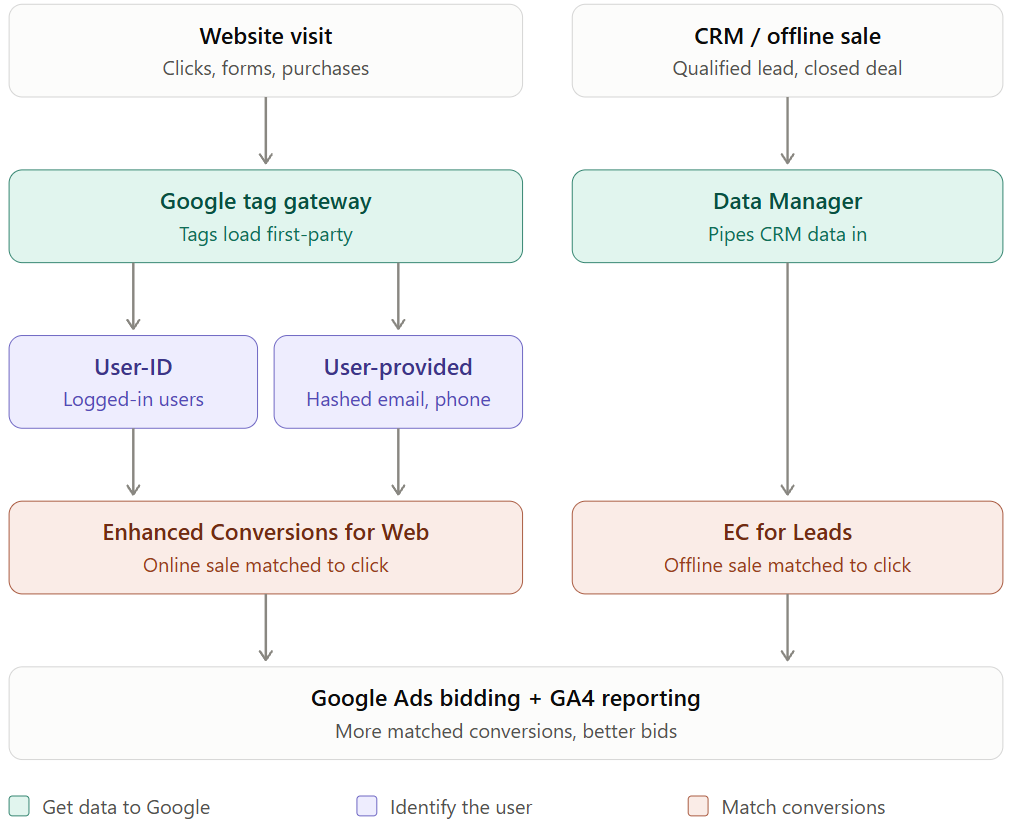
Google tag gateway fixes signal loss in the browser. Your GTM container (gtm.js) and Google tags (gtag.js) are served from your own domain (preferably same-origin) instead of Google’s (googletagmanager.com). On scale, it may provide better tagging coverage and resilience against the adblockers and browser opinionated tracking limits (e.g. Safari’s), so you capture and report more signals back to Google.
User-ID fixes cross-device fragmentation in GA4. If you send your own ID for logged-in users, phone and laptop sessions count as one user. It only works when someone is signed in, and it mainly serves GA4 reporting.
User-provided data fixes missing identity for users who aren’t logged in. You send an email or phone number from a form, it’s hashed, and Google matches it to its signed-in users. That feeds demographics, audiences and Ads bidding.
Enhanced Conversions for Web fixes online conversions that cookies miss. Hashed customer data is sent with the conversion tag, so a purchase can still be tied to an ad click when the cookie is gone.
Enhanced Conversions for Leads fixes the gap between a form fill and the real outcome. The lead is captured with a hashed email or a Match ID at form submit. Later, when the deal closes in your CRM, you upload it via the Data Manager and Google ties the sale back to the click, without needing a GCLID. This is particularly relevant in journey-aware bidding, where Google weights each stage of the sales cycle.
Data Manager is a no-code way to connect CRM, BigQuery or files to Google Ads, and one connection can feed several uses. That covers EC for Leads uploads, offline conversion import and Customer Match. It also covers Google tag and consent settings.
Additionally, Data Manager also provides an API solution, which is where Google is steering advertiser integrations. Generally, if you use the Campaign Manager 360 API or Measurement Protocol, you should plan to migrate your integrations to the Data Manager API to leverage a unified data model, enhanced user identifier encryption, and multi-destination event dispatching.
How they work together
Gateway makes sure the tag fires. User-ID and user-provided data say who the person is. Enhanced conversions use that identity to match outcomes to ad clicks. Data Manager carries in the offline half that no tag can see: closed deals for leads, returns and store sales for ecommerce. The more of the chain is in place, the more conversions reach Smart Bidding, and the better it bids. The diagram at the top shows both paths, online and offline, ending in Google Ads bidding and GA4 reporting.
Switch the features on one by one and watch how much of what really happened reaches Smart Bidding.
Offline conversions for ecommerce
For lead generation, offline data supplies the outcome: a form fill means little until the deal closes. For ecommerce the purchase tag already sends a value, so offline data corrects it. What you keep is decided after checkout, in your order system, ERP or POS.
- Returns and cancellations. Upload conversion adjustments matched on the transaction ID sent with the purchase: a retraction removes the order, a restatement fixes its value. Without them, target ROAS keeps rewarding campaigns whose orders come back.
- Store sales. In-store purchases can be uploaded as store sales with hashed customer data. Google checks eligibility per account, so ask your representative.
- New versus existing customers. Customer lists built from your order history tell Google who already bought. Customer lifecycle goals such as New Customer Value then bid higher for new customers.
What these features uncover for the business
- Campaigns that looked unprofitable. Conversions lost to blocked tags and missing cookies make CPA and ROAS look worse than they are. Recovering them can turn a “cut” into a “scale”.
- The real customer journey. One person on a phone and a laptop is one customer, so you see which campaigns really start purchases.
- Revenue you did not keep. Returns and cancellations hide behind a healthy ROAS. Adjusted, they show which campaigns sell orders that stay sold.
- Lead quality and value, not volume. Offline conversion import shows which campaigns and keywords produce closed deals, not cheap form fills. Send the deal value back and bidding can move from target CPA to target ROAS.
- Better audiences. Customer Match lists from the same Data Manager connection let you exclude existing customers or bid up for valuable ones.
Be realistic about uplift. Recovered conversions are not new sales: they are sales you could not see, and the gain comes from decisions made on the full picture.
Working with GTM? Try GTM Utility
Most of the client-side chain lives in Google Tag Manager: the Google tag, Conversion Linker, conversion tags with value and currency, user-provided data variables and consent settings. GTM Utility draws the container as a flowchart and lists the parameters of Google Ads conversion, GA4 and Floodlight tags in one table. Before you switch a feature on, you can spot duplicate conversion tags, missing values, a purchase tag that sends no order ID (so returns can’t be adjusted later) and variables that feed more than you think. It won’t measure your uplift, but it shows how the signal is wired.